In today’s competitive digital space, speed is not just a technical metric—it’s a business advantage. For companies investing in wordpress development agency london, performance directly influences SEO rankings, user experience, and ultimately revenue.
When a website loads slowly, users lose patience. As a result, bounce rates increase, conversions drop, and marketing budgets get wasted. Therefore, understanding and tracking the right speed benchmarks is essential for sustainable growth.
Why Website Speed Impacts More Than You Think
To begin with, speed shapes first impressions. A fast-loading site feels modern and trustworthy, while a slow one suggests poor quality.
Moreover, search engines prioritize performance. Consequently, slow websites often struggle to rank, even with strong content. In addition, users are far less likely to complete purchases or sign up when delays occur.
Because of this, optimizing speed isn’t optional—it’s foundational in WordPress development London strategies.
What Actually Affects WordPress Speed
Website performance depends on multiple layers working together. If one fails, the entire experience suffers.
Key Influencing Factors
- Server location and CDN
The closer your content is to users, the faster it loads. Therefore, using a CDN reduces latency significantly. - PHP version
Newer versions execute code more efficiently. As a result, upgrading PHP improves response times. - Caching systems
Proper page and object caching reduce server workload and speed up delivery. - Media optimization
Large images slow everything down. Hence, using WebP and lazy loading is critical. - Frontend efficiency
Unoptimized CSS and JavaScript delay rendering. - Third-party scripts
External tools can quietly degrade performance. - Database performance
Slow queries can bottleneck your entire site. - Traffic spikes
Without scaling, high traffic can overwhelm servers.
Each of these plays a role. Therefore, performance optimization must be approached holistically.
The Most Important Speed Benchmarks
Rather than chasing random scores, focus on metrics that impact real users.
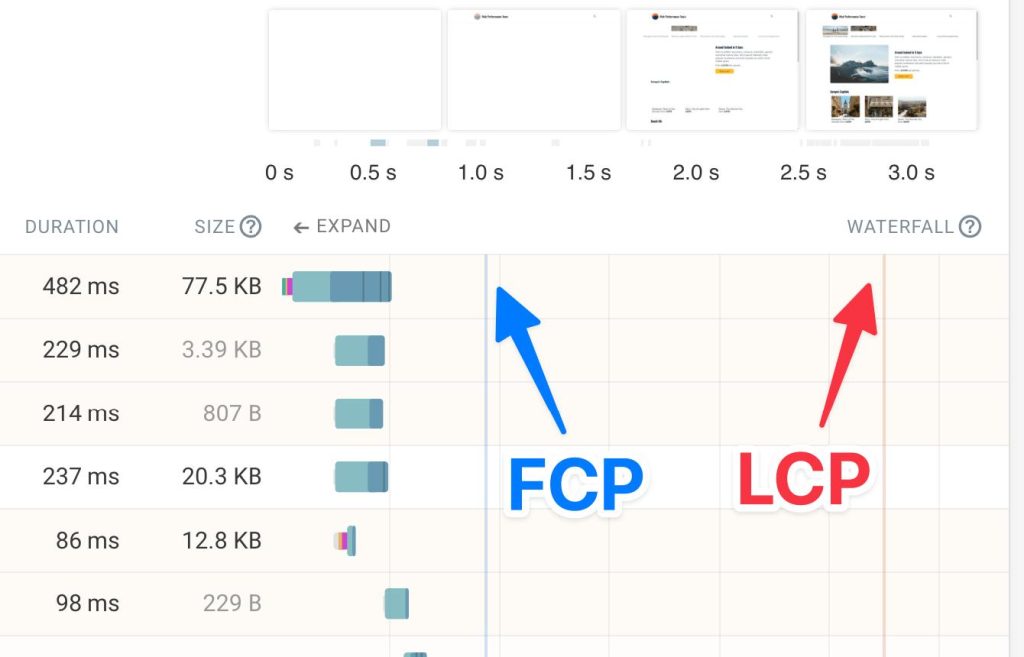
1. First Contentful Paint (FCP)
FCP measures how quickly users see the first visible content.
- Good: under 1 second
- Needs improvement: over 2 seconds
This is your first impression. Therefore, optimizing CSS and reducing render-blocking scripts is crucial.
2. Time to First Byte (TTFB)
TTFB reflects how fast your server responds.
- Ideal: under 200ms
- Problematic: above 500ms
Since this is mostly server-side, hosting quality matters most. As a result, upgrading infrastructure often provides the fastest gains.
3. Fully Loaded Time
This tracks when the entire page finishes loading.
- Target: under 3 seconds
- During spikes: under 5 seconds
To improve this, optimize assets and use CDNs. In addition, scalable hosting prevents slowdowns during traffic surges.
Tools You Should Be Using
Measuring performance accurately requires the right tools.
Google PageSpeed Insights
This tool provides:
- Core Web Vitals data
- Real-user performance insights
- Optimization suggestions
Additionally, it highlights server response issues, helping you identify backend problems.
GTmetrix
GTmetrix offers deeper technical insights:
- Waterfall charts to identify bottlenecks
- Page weight and request counts
- Visual loading timeline
Because of this, it’s especially useful for developers and agencies working in WordPress development London.
How to Interpret Your Results
Metrics alone don’t tell the full story. Instead, patterns reveal the real issues.
Common Scenarios
- High TTFB + good frontend → Server issue
- Low TTFB + slow FCP → Render-blocking resources
- Fast desktop, slow mobile → Heavy images or scripts
- Inconsistent speed → Traffic scaling problem
Therefore, always analyze results in context rather than isolation.
Best Practices for Faster WordPress Sites
Speed improvements come from consistent optimization.
Core Strategies
- Use lightweight themes
- Compress and properly size images
- Minify CSS and JavaScript
- Defer non-critical scripts
- Enable caching and CDN
- Limit heavy plugins
- Optimize database queries
In addition, implementing a staging environment allows safe testing before deployment.
Hosting: The Hidden Performance Lever
Even with perfect optimization, poor hosting can limit performance.
In WordPress development London, high-quality hosting provides:
- Faster server response times
- Automatic scaling during traffic spikes
- Built-in caching and performance tools
As a result, upgrading hosting often delivers immediate improvements without changing your code.
Common Mistakes to Avoid
Many site owners unknowingly hurt performance by:
- Focusing only on scores instead of real metrics
- Ignoring mobile performance
- Overloading pages with plugins
- Skipping performance testing
- Delaying infrastructure upgrades
Therefore, a proactive approach is key.
Final Thoughts
Speed is not a one-time fix—it’s an ongoing process. However, by focusing on the right benchmarks, you can make meaningful improvements that directly impact your business.
To recap:
- Track FCP, TTFB, and fully loaded time
- Use reliable testing tools regularly
- Optimize both frontend and backend
- Invest in strong hosting infrastructure
Ultimately, in the world of WordPress development London, faster websites don’t just rank better—they convert better, scale better, and deliver stronger long-term results.