You invest in traffic, publish content regularly, and optimize campaigns—but search engines still miss important pages. In many cases, the issue isn’t your SEO strategy. Instead, it comes down to a small but powerful file: robots.txt.WordPress Development London
In the context of WordPress Development London, optimizing robots.txt is often overlooked. However, when configured correctly, it helps search engines prioritize high-value pages, improves crawl efficiency, and reduces wasted server resources.
Why robots.txt Matters for WordPress Development London SEO
Search engine optimization relies on two things: visibility and efficiency.
If crawlers spend time on:
- Duplicate URLs
- Filtered product pages
- Admin or staging directories
Then your most important pages may not be indexed quickly.
Therefore, a properly structured robots.txt file:
- Directs bots toward revenue-driving pages
- Reduces unnecessary crawling
- Improves indexing speed
As a result, businesses focusing on WordPress Development London can gain faster rankings and more stable organic traffic.
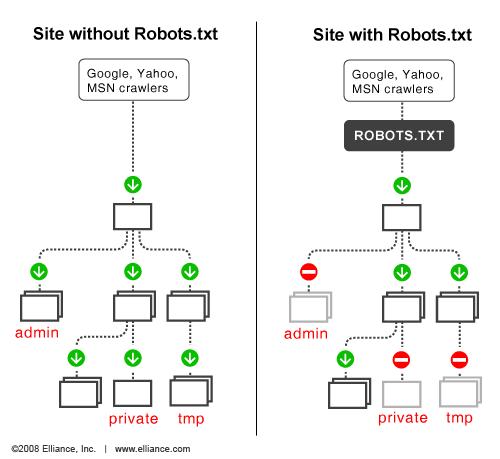
How robots.txt Works
Every search engine bot follows a simple process:
- Request
/robots.txt - Read the rules
- Decide where it can crawl
This is based on the Robots Exclusion Protocol, which most major search engines respect.
However, one key limitation:
robots.txt controls crawling, not indexing.
That means blocked pages can still appear in search results if they are linked elsewhere.
Key robots.txt Directives
Understanding these directives is essential for effective WordPress Development London SEO.
User-agent
Defines which crawler the rule applies to:
User-agent: *
Disallow
Blocks access to specific paths:
Disallow: /wp-admin/
Allow
Overrides broader restrictions:
Allow: /wp-admin/admin-ajax.php
Sitemap
Helps bots discover your content faster:
Sitemap: https://example.com/sitemap.xml
Example robots.txt Configuration
User-agent: *
Disallow: /wp-admin/
Allow: /wp-admin/admin-ajax.phpSitemap: https://example.com/sitemap.xml
This setup protects backend areas while keeping frontend functionality accessible.
How to Edit robots.txt in WordPress
In WordPress Development London projects, teams typically use one of these methods:
Manual Editing (SFTP)
- Access server files
- Edit robots.txt directly
- Upload changes
SEO Plugins
Tools like Yoast or Rank Math allow safe editing inside the dashboard.
Version Control (Recommended)
For professional teams:
- Store robots.txt in Git
- Deploy via CI/CD
- Maintain change history
This approach is widely adopted by agencies like WPbyLondon to ensure stability and traceability.
Best Practices for robots.txt Optimization
To maximize SEO performance in WordPress Development London, follow these rules:
Keep It Simple
- Use directory-level rules
- Avoid over-complication
Focus on Google First
Write rules primarily for Googlebot, then expand if needed.
Always Include Sitemap
This improves crawl efficiency and indexing speed.
Don’t Use robots.txt for Security
Sensitive data should be protected by:
- Authentication
- Server-level restrictions
Test Before Deployment
A small mistake can block your entire site from search engines.
Advanced robots.txt Strategies
Block Unnecessary Bots
Reduce server load:
User-agent: ahrefsbot
Disallow: /User-agent: semrushbot
Disallow: /
This is often implemented in WordPress Development London environments to optimize performance.
Control Dynamic URLs
For eCommerce or filtering systems:
User-agent: *
Disallow: /*?filter=*
Allow: /product/
This helps:
- Prevent duplicate content
- Improve crawl budget
Common Mistakes to Avoid
Even experienced teams in WordPress Development London make these errors:
Blocking CSS and JS
Search engines need these files to evaluate your site properly.
Incorrect Wildcards
Poor patterns can block unintended URLs.
Leaving Staging Rules Active
Disallow: /
If left in production, your site disappears from search.
Ignoring Logs
Server logs reveal crawler behavior—use them.
How to Test robots.txt
Google Search Console
- Test URL access
- Validate rules
- Identify blocked pages
Crawl Simulation Tools
Use tools like Screaming Frog to:
- Simulate bot crawling
- Compare results
- Detect issues
Post-Deployment Monitoring
After updates:
- Check traffic trends
- Monitor indexing
- Roll back if needed
Final Thoughts
robots.txt is a small file with massive impact.
For businesses investing in WordPress Development London, it plays a key role in:
- Improving crawl efficiency
- Enhancing SEO performance
- Reducing wasted resources
Action Plan
- Audit your robots.txt
- Align rules with business goals
- Test before deployment
- Monitor continuously
When combined with a strong infrastructure and expert implementation—like the approach used by WPbyLondon—robots.txt becomes a precision SEO tool rather than a risk.